
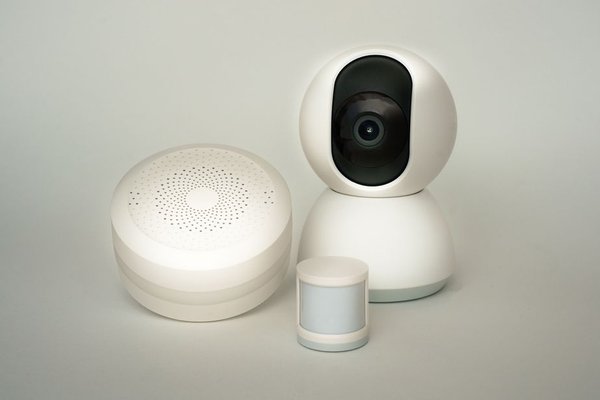
A smart apartment does not need a rewired light switch, a replacement thermostat, or a conversation with the landlord about drilling into walls. For renters, the best automation starts with objects you already own: lamps, fans, speakers, and portable accessories. They can make everyday routines easier without becoming permanent parts of the property.
The trick is to shop with moving day in mind. Choose devices that unplug, unscrew, or peel away cleanly, and build routines that still make sense when your next apartment has different rooms. Smart home automation for renters works best when convenience and reversibility matter equally.
Start With the Devices You Can Pack
Smart plugs for ordinary lamps
A smart plug sits between an electrical outlet and a compatible appliance. It can turn a simple bedside lamp on at sunset, switch off decorative lighting at bedtime, or run a desk lamp on a weekday schedule. Look for a plug rated for your country’s outlets and the connected device’s electrical load.
Choose appliances that safely resume operating when power returns, and never use a smart plug to bypass safety features. Space heaters and other high-wattage heating appliances are poor candidates for unattended automation. Check both the smart plug’s instructions and the appliance manual before connecting anything beyond basic lighting.
Smart bulbs instead of new switches
Smart bulbs are useful when you want dimming, warmer evening light, or a morning wake-up routine without touching the wiring. They work particularly well in table lamps and floor lamps. Confirm the bulb’s socket type, physical size, and compatibility with enclosed fixtures before ordering.
There is one everyday catch: many smart bulbs need the lamp’s power switch left on so they can receive commands. If a housemate habitually flips that switch off, a smart plug controlling a regular bulb may be simpler. For more layout-specific inspiration, consider small-apartment lighting ideas that use existing outlets rather than installed fixtures.
Battery sensors and portable controls
Motion, contact, and temperature sensors can make a renter smart home feel responsive. A battery-powered motion sensor might trigger a soft hallway lamp after dark. A contact sensor can remind you that a balcony door was left open. Some devices need a separate hub, so read the packaging before assuming your Wi-Fi alone is enough.
For a no-drill smart home, place sensors on furniture, freestanding shelves, or suitable removable mounts rather than permanent fittings. Adhesive products can still damage delicate paint or leave residue. Test an inconspicuous area, follow surface instructions, and avoid attaching gadgets to fire doors or required safety equipment.
Speakers that coordinate everything
A portable smart speaker can make voice control convenient, but it is optional. Many plugs and bulbs work from phone apps, schedules, or compatible wireless buttons. A speaker earns its place when you regularly use a single command to control several devices or want hands-free access while cooking.
Build Routines Around How You Actually Live
Apartment automation is most useful when it removes small repeated tasks, not when it creates a complicated dashboard. Start with one problem. Maybe you cross a dark living room every evening, forget to turn off a desk lamp, or wake before sunrise.
Here is a practical setup for a one-bedroom rental: put a compatible smart plug on the living-room lamp and another on the bedside lamp. Schedule the first to turn on shortly before your usual arrival home, then turn off at bedtime. Set the bedroom light for a gentle morning routine if its bulb supports dimming. After a week, adjust the timing to match your real schedule. Keep manual controls accessible for guests and outages.
Check Compatibility Before Buying More Gear
The phrase portable smart devices does not automatically mean interchangeable smart devices. Some products connect directly over Wi-Fi; others use Zigbee, Thread, Bluetooth, or a manufacturer’s bridge. A device advertising Matter support may work with several major ecosystems, but check the exact model, controller requirements, and supported features rather than assuming every feature transfers.
For example, Matter devices using Thread generally need a compatible Thread border router. Some speakers and hubs provide that function; others do not. If your rental has building-managed Wi-Fi, guest-network restrictions or sign-in pages may also prevent devices from finding one another. Confirm that you can connect personal devices on the network before spending heavily. Protect app accounts and respect housemates’ privacy.
Respect the Lease and the Space
Before mounting or replacing anything, read the rental agreement. Replacing a hardwired switch, fitting a smart thermostat, altering locks, or modifying an intercom may require permission or professional installation. Portable accessories usually create fewer complications, but even removable mounting products can breach specific building rules or harm surfaces.
Cable clutter is another overlooked problem. Keep plugs accessible and cords away from walking routes, water, and pinch points. Do not overload outlets or daisy-chain power strips. A simple cable-management plan for small spaces can make a modest setup look more polished than an expensive collection of exposed gadgets.
Make Moving Day Part of the Plan
Keep boxes, setup codes, spare adhesive strips, and a list of which device belongs in each room. Before leaving, remove devices from their apps as appropriate, reset them according to the manufacturer’s instructions, and restore any original ordinary bulbs. Photograph the room before and after removing accessories if the rental deposit is a concern.
At the new place, rebuild your routines around its layout rather than blindly restoring every schedule. A hallway sensor may become a closet sensor. The lamp that once lit your front entrance might work better beside the sofa. Portability is valuable because the equipment can adapt while the lease, floor plan, and daily habits change.
Frequently Asked Questions
Can renters have a smart home without changing the wiring?
Yes. Smart plugs, compatible bulbs, portable speakers, and battery sensors can provide useful automation without electrical work. Avoid altering installed fixtures unless your landlord approves and any required qualified professional performs the work.
Do I need a hub for a renter-friendly setup?
Not always. Some Wi-Fi devices work directly through an app. Others require a hub or bridge, and Matter-over-Thread devices need suitable Thread network infrastructure. Check the exact product requirements before purchase.
Will smart home devices still work after I move?
Most portable devices can be set up again, provided the new home has compatible outlets, fixtures, and networking. You may need to reset products, reconnect them to new Wi-Fi, or rebuild automations.
What is the best first smart home purchase for an apartment?
For many renters, a smart plug paired with an ordinary lamp is a low-commitment place to start. It demonstrates scheduling and remote control without modifying a fixture. If adjustable color or brightness matters more, try a compatible smart bulb instead.
Small Changes, No Permanent Commitments
The strongest renter-friendly setup is rarely the one with the most devices. Start with a lamp or two, solve a real annoyance, and add sensors or voice control only when they serve a purpose. With reversible equipment and a little planning, your smart home can improve the apartment you live in now and follow you to the next one.